
What is proximity networking?
The part of an event nobody made navigable.
You have trouble finding your mom in a grocery store. But you are supposed to find the right stranger in a room of thousands.
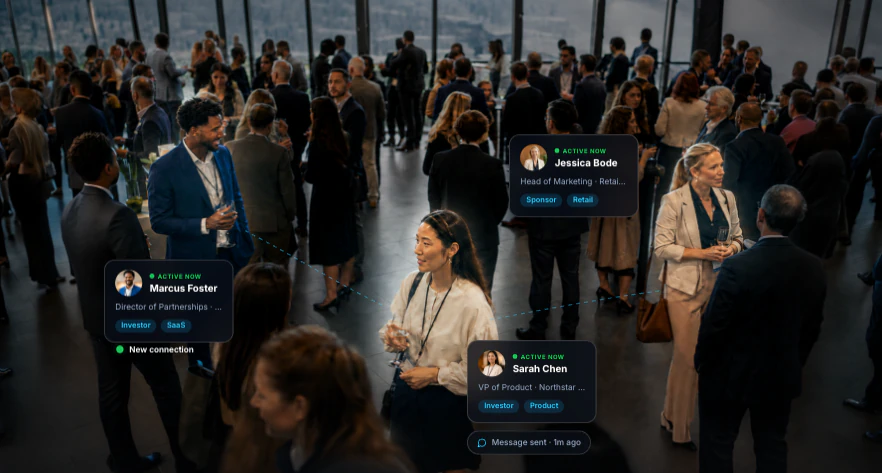
Nobody built a tool for that. So we did. We call it proximity networking: it shows you who is physically near you at an event, ordered by how close they are, so you can find the people worth meeting while you are still standing in the room with them.
That is the whole idea. The rest of this article explains where the gap came from, how the approach differs from other event software, and when it is the wrong tool.
Everything got an upgrade except the room
Most event technology optimizes the agenda. Registration went digital. Badges got smart. Sessions stream in high definition. The schedule lives in an app with a search bar.
The room never received that treatment. Hundreds of people in one place, each bringing relationships and opportunities, and the only tool for finding the right ones is to walk around reading name tags.
That is the strange part. The real product of an event is the room —the one part left to chance.
Someone we spoke with recently came back from a conference in Berlin with seventy thousand attendees. Seventy thousand. Where do you start? Who do you talk to first? How do you know who is actually worth meeting?
That is the expectation at nearly every conference, trade show, and networking event, scaled down but not changed. Hundreds or thousands of people in one place, and everyone is supposed to somehow find the right few.
What people do instead is predictable. Watch where attendees go in the first ten minutes and they head straight for the handful of faces they already know. It is comfortable, efficient, and it fills the time. But a conference is not a reunion, and treating it like one defeats the purpose of being in a room full of strangers.
The room stays full of people who could change something — a hire, a deal, a partner — and most of them remain strangers for the same reason familiarity wins.
Familiarity is easier to find than opportunity.
What we built
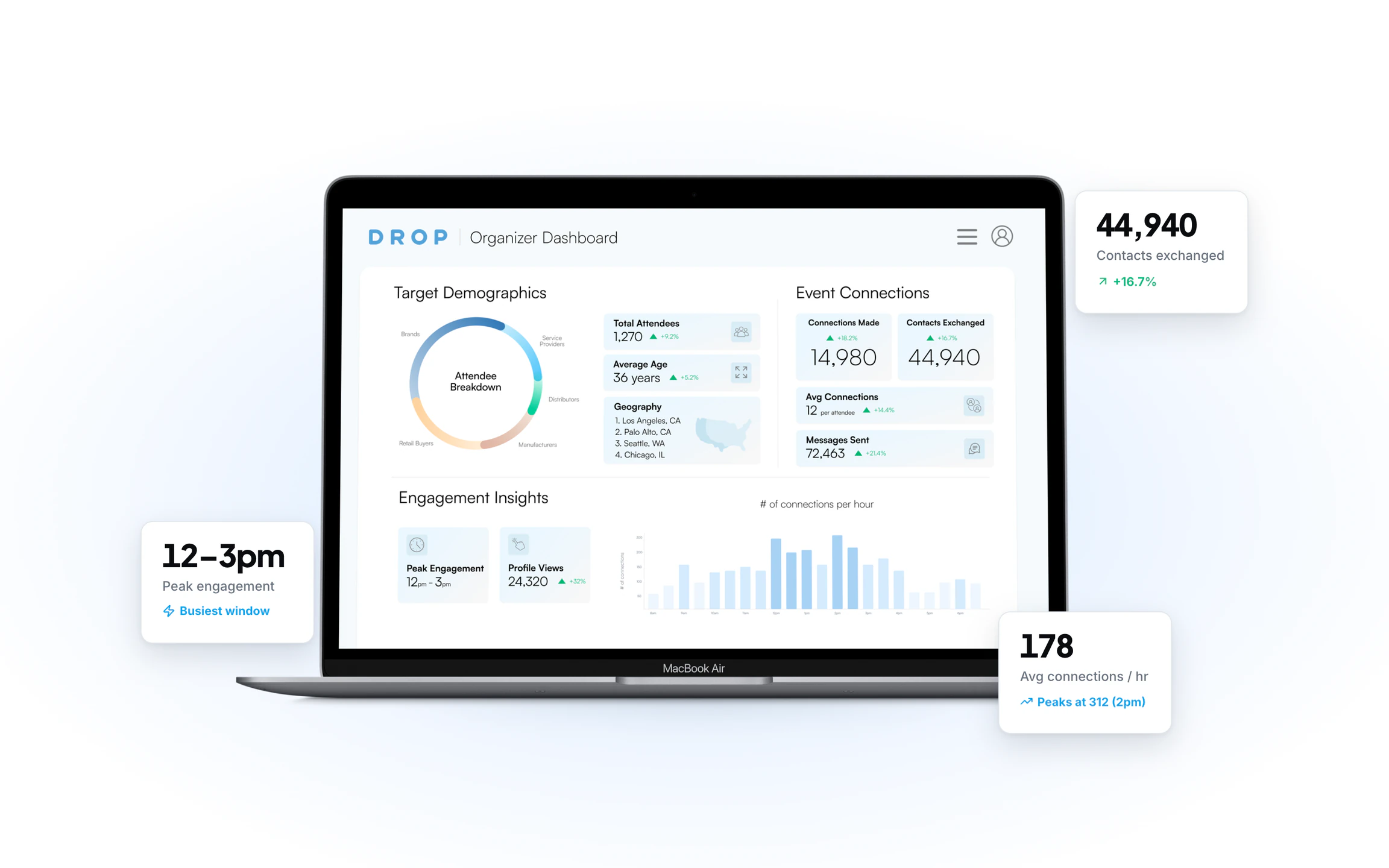
Drop Professionals is a live networking app for in-person professional events. Attendees check in and see everyone at the event, with the people nearest to them at the top of their feed. Then, organizers get a real-time dashboard of the connections, engagement, and impact their event produced.
Two things set it apart from the rest of the category. It is live, so the list reflects who is in the building right now rather than who registered three weeks ago. And it is ranked by distance, so the first person you see is someone you could walk up to in the next thirty seconds.
Here is what it looks like in use.
- Check in. Open the app at the venue and join the event's space. No account hunting, no agenda to configure.
- See the room. A live feed of attendees appears, with the closest first. Each entry is a profile: name, title, company, and what they are there for.
- Filter. Narrow by role, industry, company, or what someone is looking for. An insurance carrier looking for agents filters differently than a vendor looking for customers, even though both are standing in the same room.
- Connect. Reach out in the app or walk over. The point is to start the conversation, not to stay on the phone.
- Keep it. The connections persist after the event ends. You can still see who you met, and discover who you did not.
Step five matters more than it sounds. Most networking technology stops working when the event ends, which is exactly when people start trying to remember who they talked to.
How this differs from the rest of the category
These get confused constantly, including by the people selling them.
| What it answers | When it runs | Works best when | |
|---|---|---|---|
| Proximity networking | "Who is near me right now, and which of them should I meet?" | Live, in the room | Attendees are in one physical place and need to act within hours |
| AI matchmaking | "Based on our profiles, who should I meet at some point?" | Before the event, from registration data | There is a long lead time and attendees will read recommendations in advance |
| Scheduled meetings | "Who has agreed to meet me at 2:15?" | Pre-booked | Buyers and sellers with a fixed agenda, like a hosted-buyer trade show |
| Badge scanning / lead retrieval | "Who stopped at my booth?" | At the booth, after contact | Exhibitors capturing leads they have already spoken to |
| All-in-one event apps | "What is on the agenda and where is room 4B?" | Throughout | Logistics, schedule, and content delivery |
| "Who do I already know, and who do I want to know generally?" | Always, everywhere | Following up afterwards, or researching ahead of time |
The distinction worth holding onto: matchmaking tells you who to meet, while proximity tells you who is available to meet. One is a recommendation; the other is an opportunity with a thirty-second window. Most events need both. Most events have neither.
When it is the wrong tool
Saying so is more useful than pretending otherwise.
Events with about fifty people or fewer do not need it. At that size, attendees meet everyone anyway, and software adds a step to a problem that does not exist.
Virtual and hybrid events are irrelevant here. Proximity means physical distance. Without a shared room, there is nothing to rank.
Events where attendees have no reason to meet — such as a one-way training session or a closed briefing — yield nothing. The value comes from attendees being useful to one another.
And it does not replace an event app. If what you need is a schedule, a floor map, and push notifications, that is a different product. Drop runs alongside those without touching the programming.
Why organizers care, not only attendees
Attendees get a better room. Organizers get something they have never had: a record of the room’s output.
Ask an organizer how their event went, and the answer is a feeling. Good energy. Strong turnout. People seemed happy. None of that is a number you can present to a sponsor or defend in next year's budget.
When the room runs on a live network, the connections become countable. How many people met. How many contacts were exchanged. When the room was most engaged. The most valuable part of the event stops being invisible.
That side of it is covered in how to measure networking at an in-person event.
The short version
Make strangers as easy to find as familiar faces. Event programming has been optimized for years, but the room hasn’t. This is what was missing.
To see what it looks like on your floor, request a demo — it is a 20 minute call.
FAQs
Is proximity networking the same as geofencing?
No. Geofencing triggers an action when someone enters an area, like a push notification at a booth. Proximity networking ranks people by how close they are to each other, so an attendee can decide who to approach. One is about places, the other is about people.
Does it require attendees to share their location?
Within the event, yes. Attendees opt in when they check in. Location is used to order the attendee feed while they are at the event, and it stops when the event ends. Drop Professionals does not track attendees outside the event.
What size event does this make sense for?
Roughly a hundred attendees and up. Below about fifty, attendees meet everyone without help. Between fifty and a hundred, it starts to pay off. Above five hundred, unaided networking becomes mostly chance, which is where it matters most.
Can it work alongside our existing event app?
Yes. Drop Professionals does not replace a schedule, agenda, or floor map, and it needs no changes to programming. Organizers share their event details and Drop handles setup, activation, and the dashboard.
Where does the term "proximity networking" come from?
It’s a descriptive name, not a trademark. It refers to any tool that surfaces nearby attendees—a practice older than the software itself: finding the person standing twenty feet away whom you should have met.

See proximity networking on your floor.
A 20-minute walkthrough of the live attendee feed and the organizer dashboard behind it.