Event networking apps, honestly compared
Matchmaking, proximity, and all-in-one: which category fits your event.
Most event technology optimizes the agenda, registration, schedules, and floor maps.
The real product of an event is the room. Hundreds of people in one place, each bringing relationships, opportunities, and potential connections. That is where the value lives, and most of it is left to chance.
When shopping for a networking tool, the challenge isn’t comparing features. It’s figuring out which of three categories you need, since vendors in all three use the same terms. Here’s the map.
The three categories
Matchmaking software uses registration data to recommend who each attendee should meet, usually before the event. Some versions let attendees request meetings that are scheduled into slots. It works with profiles and stated interests.
Built for: events with a long lead time, where attendees will read recommendations in advance, and for buyer-seller events with structured meeting agendas.
The limit: a recommendation is not an opportunity. Knowing you should meet someone does not help if you cannot find them in a room of two thousand, and no-show rates on pre-booked meetings are a known problem.
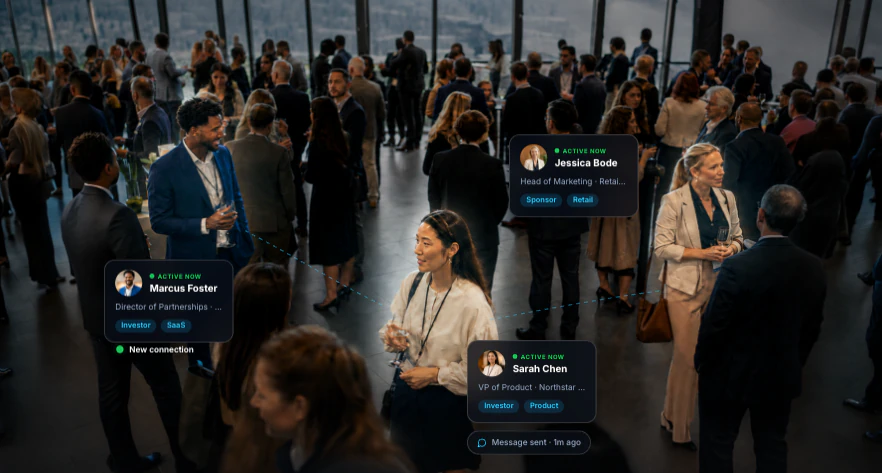
Proximity networking shows attendees who is physically near them right now, ranked by distance, and lets them filter to find who they are looking for. It works on presence.
Built for: in-person events where attendees need to act within hours and rooms large enough that unaided networking becomes guesswork.
The limit: it needs people to be in a shared physical space. Virtual and hybrid formats get nothing from it, and very small events do not need it.
All-in-one event apps bundle the agenda, the map, speaker bios, push notifications, and usually some networking features alongside everything else.
Built for: logistics and content delivery across a multi-track event.
The limit: networking is one of twelve features, so it is rarely the best version of any of them. Attendees open the app for the schedule, and the networking tab goes unused.
How the categories compare
| Matchmaking | Proximity | All-in-one app | |
|---|---|---|---|
| Core question | Who should I meet? | Who can I meet right now? | Where do I need to be? |
| Runs on | Registration profiles | Live presence in the venue | Event logistics data |
| Timing | Before the event | During, in the room | Throughout |
| Attendee action | Read suggestions, request meetings | Browse the room, filter, approach | Check the schedule |
| Best event size | Any, with lead time | 100+ | Multi-track, any size |
| Virtual events | Yes | No | Yes |
| Reporting on connections | Meetings booked and held | Connections, contacts exchanged, peak windows | Usually limited |
| Typical failure mode | Recommendations ignored; meeting no-shows | Nothing, if the event is too small | Networking tab unused |
The products people compare
Vendors usually sit mainly in one category even when they advertise all three.
- Whova, Cvent Attendee Hub, Bizzabo — all-in-one event apps with networking features alongside agenda, registration, and content.
- Drop Professionals — proximity networking, in-person only. Attendees check in and see everyone at the event, with the people nearest to them at the top of their feed. Then, organizers get a real-time dashboard of the connections, engagement, and impact their event produced.
- LinkedIn — not event software, but the default tool attendees reach for. Good for following up and for research, no help with who is in the room.
To be clear about our position: Drop does not handle agendas, registration, floor maps, session check-in, or content. If you need an event app, you need an event app. Drop runs alongside one, and most of our events already have one.
Four questions that pick the category
1. Is your event in one physical place?
If not, proximity is out. Matchmaking or an all-in-one app.
2. How many attendees, and do they already know each other?
Under fifty and mostly familiar, you do not need networking software. Over a few hundred and mostly strangers, proximity takes precedence.
3. Do attendees have a reason to prepare in advance?
A hosted-buyer trade show where attendees will spend an hour reviewing matches is matchmaking's best case. A one-day association conference where attendees show up cold is not.
4. What do you have to report afterwards?
If a sponsor or a board is asking what the room produced, check what each option actually records. Meetings booked is a different number from connections made, and "engagement" in an all-in-one app usually means screen taps.
Where most events land
The common answer is two tools, not one: an event app for logistics and a networking layer for the room. The mistake is assuming the app's networking tab counts as the second tool.
The other common answer is one tool and honest expectations. A small event with a familiar crowd needs neither.
The real product of an event is not the programming. It is the connections inside the room. Whatever you choose should be judged on that.
To see what the proximity version looks like at your event, request a demo —if a different category fits better, we will let you know.
FAQs
What is the difference between a networking app and event matchmaking software?
Matchmaking recommends who to meet based on registration profiles, usually before the event. Proximity networking shows who is physically near you during the event, ranked by distance, so you can act immediately. One produces a list of suggestions, while the other surfaces people you can walk up to.
Do we need a networking app if we already have Whova or Cvent?
It depends on whether your attendees actually use the networking features in those apps. All-in-one apps are built around the agenda and logistics; networking is just one feature among many. Drop Professionals runs alongside them without changing the programming.
What is the best event networking app?
There is no single answer, because the three categories solve different problems. Matchmaking fits events with long lead times and structured meetings. Proximity fits in-person events large enough that finding the right person is guesswork. All-in-one apps fit logistics-heavy multi-track events.
Can one app do matchmaking and proximity networking?
Some platforms claim both. In practice, vendors are built around one model and add the other as a feature, so check which one the product is actually organized around and how each is reported.
Does Drop Professionals replace our event app?
No. Drop does not handle agendas, registration, maps, or content. It covers the room itself — who is here and whom you should meet — and runs alongside whatever event app you already use.
Find the right fit for your event.
See the proximity version in action — and if a different category fits better, we'll tell you.